

Maya is encouraging customers to use the security tools available in its app to manage account access and protect financial transactions, including trusted-phone enrollment, biometric approval for Send Money, transfer limits, and login monitoring.
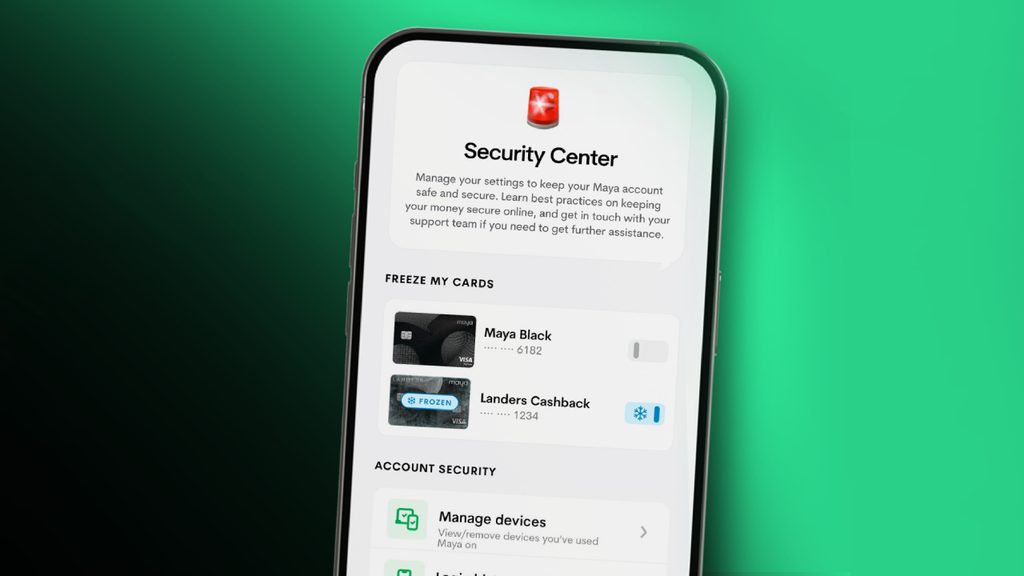
Why it matters: Digital financial services require both platform-level security measures and user awareness. Maya’s Security Center brings several account controls together in the app, giving customers more ways to monitor access and manage how transactions are approved.
The details: Maya introduced its Security Center late last year and has continued to expand the security controls available to customers. The feature brings account protection tools and access to customer support together in one area of the app.
Customers with upgraded Maya accounts can enroll trusted phones through Security Center, which can be accessed through Profile or Services. Users may also be prompted to enroll after logging in.
Once a phone is enrolled and passes Maya’s security checks, customers can use Face ID or a fingerprint instead of an SMS one-time password to approve Send Money transactions.
The Account Security section also allows customers to view and remove trusted phones. Users can review their previous account access through Login History and manage other account information, including their registered mobile number, password, and email address.
Maya Black and Landers Cashback Everywhere credit cardholders can also use Freeze My Cards to temporarily freeze their credit cards directly through the app.
Another feature available through the Security Center is Transfer Limits. Customers can manage limits for InstaPay transfers from Maya Wallet to other banks, as well as Insta-fill transfers from Maya Savings into Maya Wallet.
These customer-facing controls complement Maya’s broader security systems, including AI-supported fraud monitoring.
Maya Philippines and Maya Bank also maintain ISO 27001 certifications for information security management and ISO 27701 certifications for privacy information management. According to Maya, these certifications have been continuously held since 2022 and 2023, respectively.
The bigger picture: Security is becoming an increasingly important part of digital banking and e-wallet services as more financial transactions move online.
Features such as trusted-device enrollment, biometric authentication, transaction limits, login history, and card freezing give customers more direct control over their accounts. They can also provide additional layers of protection when a user suspects that an account or device may have been compromised.
Maya is also using customer education alongside its technical safeguards through Maya ScamPatrol, which provides information about common fraud tactics and safer digital habits.
The campaign is designed to help customers recognize suspicious messages, requests, and other attempts to obtain sensitive information.
Between the lines: Security features are most useful when customers know where to find them and understand when to use them. Trusted-phone enrollment, for example, allows users to replace SMS-based approval for Send Money transactions with biometric authentication on an enrolled device.
Meanwhile, Login History can help customers identify account activity they do not recognize, while Transfer Limits can reduce the amount that can be moved through certain types of transactions.
Freezing a card can similarly provide a quick response when a customer believes their credit card may be at risk.
These controls do not replace basic security practices. Customers still need to be cautious about links, messages, calls, requests for passwords or verification codes, and other attempts to gain access to their accounts.
For Filipinos: Maya’s security tools give users several options for managing their accounts directly from the app.
Customers can check their Login History, review trusted devices, update account details, set transfer limits, and freeze eligible credit cards without having to leave the Maya app.
Maya also works with government and law enforcement agencies, including the Bangko Sentral ng Pilipinas (BSP), Cybercrime Investigation and Coordinating Center (CICC), Department of Justice (DOJ), and Philippine National Police (PNP).
The company also supports CICC’s Scam Safe initiative, which focuses on improving public awareness of online scams and cyber fraud.
What’s next: Maya said it will continue strengthening its security controls, monitoring systems, employee awareness, and incident response capabilities. The company is also continuing its cooperation with government and industry partners on customer protection and scam prevention.
Customers can access Security Center through the Maya app and review the available controls for their account.
The Bottom Line: Maya is reminding customers that several account security tools are already available inside its app. Trusted-phone enrollment, biometric Send Money approval, Login History, card freezing, and transfer limits give users more ways to manage access and transactions, while Maya’s platform-level safeguards and scam-awareness efforts provide additional layers of protection.
Get the latest from WALASTECH directly on your Google feed.
Add as a preferred source on Google